FEATURES
What you open every day, in one place.

HABITS
Obligatory prayers logged. Good habits follow.
The five obligatory prayers become habits automatically, with a reminder before the time runs out if you haven't ticked them. Add your own habits from the examples or write your own, then see your streak and 7-day summary.

QUR'AN
Read in Qur'an Kemenag or your mushaf. LillahLife keeps the log.
Set a daily ayah goal, log how far you read, and see your progress towards khatam by juz. Memorisation and revision are logged too. Tomorrow LillahLife knows exactly where to continue.
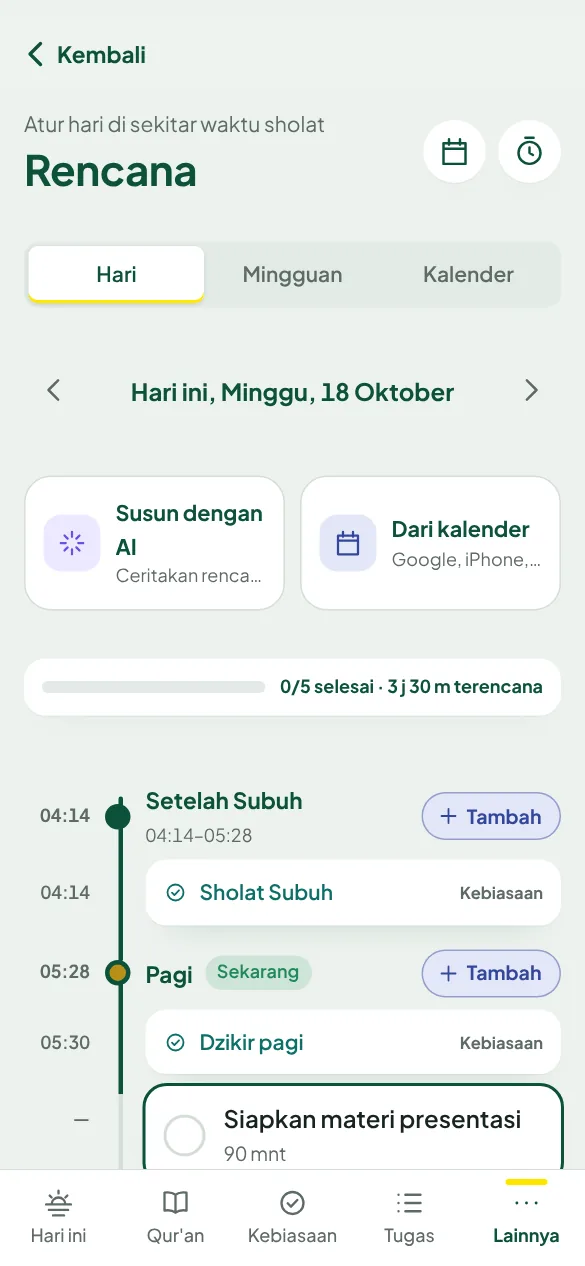

PLAN & FOCUS
Plan your day around the prayers.
The day is split into After Fajr, Morning, After Dhuhr, through to After Isha. Tasks, habits and reminders in one view. The Pomodoro focus timer stops by itself before the adhan.

REMINDERS
Reminded at the adhan, plus one reminder of your choice.
A notification right when the prayer time begins, plus one reminder you choose: a few minutes before the adhan, or 30 minutes before the time runs out if you haven't ticked that prayer. At most two per prayer, on all your phones even when LillahLife is closed.


NOTES & VOICE
Listen to the lecture. The notes write themselves.
Tap Record a lecture and put your phone near the speaker. The talk appears as text with timestamps and saves itself. When it ends, Tidy with AI turns it into a title, points and suggested tasks. No audio is recorded, only the text.
Daily hadith
One sahih hadith from HadeethEnc.com every day, shown in full with its source. Save it, find it again by topic, and share it neatly to WhatsApp.
Sunnah reminders
Sunnah practices appear at the right time, each with its sahih evidence. Turn on their notifications one by one, or make them tasks and habits.
Clean notifications
The notification inbox starts fresh every day. Yesterday's don't pile up.
ON YOUR LAPTOP TOO
The meeting runs. The notes write themselves.
The LillahLife Chrome extension: a prayer countdown in the toolbar, and a side panel that stays open as you switch tabs. Record a meeting as text, then tidy it into a summary and tasks.


A MORE ORGANISED LIFE
From intention to plan, from plan to done.
Big goals broken into steps, calendar events coming in by themselves, and AI helping you plan your day around the prayers.

GOALS
Measurable yearly goals.
Start from examples like "Memorise Juz 30 (37 surahs)" or "Finish the Qur'an this year", then break them into measurable steps you can add with one tap. See at a glance what's on track, needs catching up, or is late.

PLAN & CALENDAR
Tell it your plans, AI lays them out.
Write freely whatever you want to get done; AI places it in the right prayer slot. Events from Google Calendar, iPhone or Outlook come in automatically as tasks, with their categories.
Weekly plan
Seven days split by prayer times, with 3 focuses for the week. See which days are busy after Dhuhr and which still have room.
Stats you can tap
Every number in Tasks, Habits, Focus and Qur'an can be tapped to see the list behind it.
Weekly muhasabah
Your week in one sentence, your best day, then a short reflection that ends with one intention for next week.
NOTES & VOICE
Write, dictate, or just record.
A private journal, lecture notes, even meeting minutes. Only you can read them.
NOTES & VOICE
Listen to the lecture. The notes write themselves.
Tap Record a lecture and put your phone near the speaker. The talk appears as text with timestamps and saves itself. When it ends, Tidy with AI turns it into a title, points and suggested tasks. No audio is recorded, only the text.
Dictation with punctuation
Tap the microphone and speak. Say "period", "comma" or "new line" and the text goes at the end of your note.
Tidy with AI
A messy transcript becomes a title, points and a summary without changing what was said. Things to do are suggested as tasks.
Record meetings on your laptop
In the Chrome extension, the side panel stays open as you switch tabs, so the recording keeps going.
LECTURES & COMMUNITY
Lectures near you, just show up.
Follow mosques, mushollas, majelis taklim or communities near you. Their schedule comes into Today, and reminders arrive by themselves.

DISCOVER
Mosques and events near you.
Search by name or city, or see what's within 1 to 50 km. Tap Follow, and new events show up on your phone.

TODAY
This week's events, right on your home screen.
Lectures from the mosques you follow for the next seven days appear in Today, with a reminder before they start. If an event needs registration, your ticket is kept here too.

LEARNING PATHS
Learn step by step from your mosque.
The mosque team builds learning paths: lectures, readings and tasks in order. Lecture steps tick themselves off when your attendance is recorded. Invite friends via WhatsApp.
Register only when needed
Most lectures are open, no registration. For events with limited seats, register in seconds, join the waiting list when full, then show your ticket at the door.
Stories from those who came
After an event, attendees give a rating and write what they took away, so the benefit reaches those who couldn't come.
Invite friends
Share LillahLife, a mosque, an event or a learning path to WhatsApp with neat text and a QR image.
PRIVACY
Your data, your control.
Your worship records are your business. We don't sell data and we don't show ads.
Download your data
A copy of all your data in one file, any time, from Account.
Reset account
Start over like a new account, without losing your Pro plan or payment history.
Delete account
Your account and all your personal data are permanently deleted.
AI for text only, with your permission
AI is used only to tidy and organise your own writing, after you agree. It doesn't make images and doesn't write Qur'an verses or hadith.
Keys kept safe
Service keys and your calendar links are stored encrypted on the server.
Mosque reports for their congregation
A mosque's cash report is only visible to its followers and team.
INSTALL ON YOUR PHONE
Install it straight from your browser.
The official web app from lillah.life: open it in your browser, add it to your home screen, and it opens like any other app, reminders included. Permissions are only asked for when you use a feature, and you can delete your data at any time.
Android
- Open lillah.life/app in Chrome.
- Tap Install the app, or the ⋮ menu then Add to home screen.
- Open LillahLife from the home screen and allow notifications when asked.
iPhone
- Open lillah.life/app in Safari.
- Tap Share, then Add to Home Screen.
- Open LillahLife from the home screen, then turn on reminders (iOS 16.4 or later).
IPHONE WIDGET
LillahLife on your home screen.
The next prayer with a countdown, prayer times, habits, tasks, Qur'an and today's summary. On the Lock Screen too. Set up with the free Scriptable app in about two minutes; the steps are in the app.
On Android, LillahLife already installs and sends reminders. Android home screen widgets are coming.


CHROME EXTENSION
On your laptop too.
A prayer countdown in the Chrome toolbar, a reminder when each prayer begins, habits and tasks to tick off, and a side panel that records meetings into notes. Save text from the web to Notes with a right-click.
Start today.
Free, no ads. Open it on your phone or laptop with the same account.
Open lillah.life/app